레이블이 델파이인 게시물을 표시합니다. 모든 게시물 표시

2016-03-30

델파이에서 동적으로 Package (bpl) 이용하기 (MDI Child)

매번 느끼는 거지만, 뭐가 좋다고 내가 델파이를 이리도 가까이 두는지 모르겠다.
궁금증을 달래줄 자료도 부족하고, 툴이 무료도 아닌데 말이지!!

이번에도 특별한 문제거릴 하나 만났는데, 'bpl을 동적으로 활용하는 방법' 이었다.

대형 MDI 폼을 만들다 보면 수많은 Child 폼을 만들때가 있는데, 하나의 exe 파일에 모든 폼을 다 등재하기엔 좀 무리가 있지 않겠는가? 그래서, 대안이 dll사용인데, 그보다 bpl로 활용하면 여러 잇점이 있다.
델파이 자체형 dll 격이기 때문에, 호환성 측면에서 좋다고나 할까?
여튼, 그 문제는 차치하기로 하고 프로그램 분할에 있어서 bpl을 사용하면 여러모로 신경쓸게 적어져서 좋다.

이번에도 사용자 폼을 bpl로 만들어서 MDI 폼에서 Child로 활용하려고 예제를 하나 만들었는데, 좀처럼 해결이 되지 않았던 부분이 있었다. 그래서 경험을 토대로 기록을 남긴다.

아, 그리고... 이 예제는 XE10 최신 버전을 가지고 활용했다.
인터넷에 널린 '예제들', '설명들' 이것들은 죄다 예전버전이라 설명이 그럴듯해 보이긴 해도, 최신 버전에 적용하면 여지없이 오류난다.

그럼 이제 작업시작
먼저, 이 예제 포스팅의 최종 목적은 이러하다.
-
두개의 폼이 있는데, 하나는 MDIForm, 또 하나는 MDIChild로 구성한다.
MDIForm의 버튼을 클릭하면, MDIChild를 호출하여 불러온다.
끝
-

간단한 예제인 만큼, 신경쓸일도 적다. 근데, 이거 하나 최신개발버전에 맞게 명쾌하게 알려주는 이 없어 답답하더라.

1. 폴더구성.
-main폴더는 mdiform
-child폴더는 mdichild 만 담아둘것이고
-output폴더는 최종 컴파일된 산출물 파일들을 담을곳이다


2. MDIForm 만들기
-폼 만들고, 폼스타일 변경하고, 버튼 하나 올리자
-main폴더에 저장한다


3. MDIChild 만들기
-Project Manager View에서 projectGroup1 을 선택하고 새 프로젝트 - package를 추가한다.
-패키지에 Contains 폴더 하위에 새폼 하나 생성하고 child 폴더에 저장한다.
-이 폼은 child폼으로 쓸거니까, 폼 스타일을 child로 바꾼다.
-ProjectGroup은 상위 폴더인 '테스트'에 바로 보이게 하는게 낫겠죠?
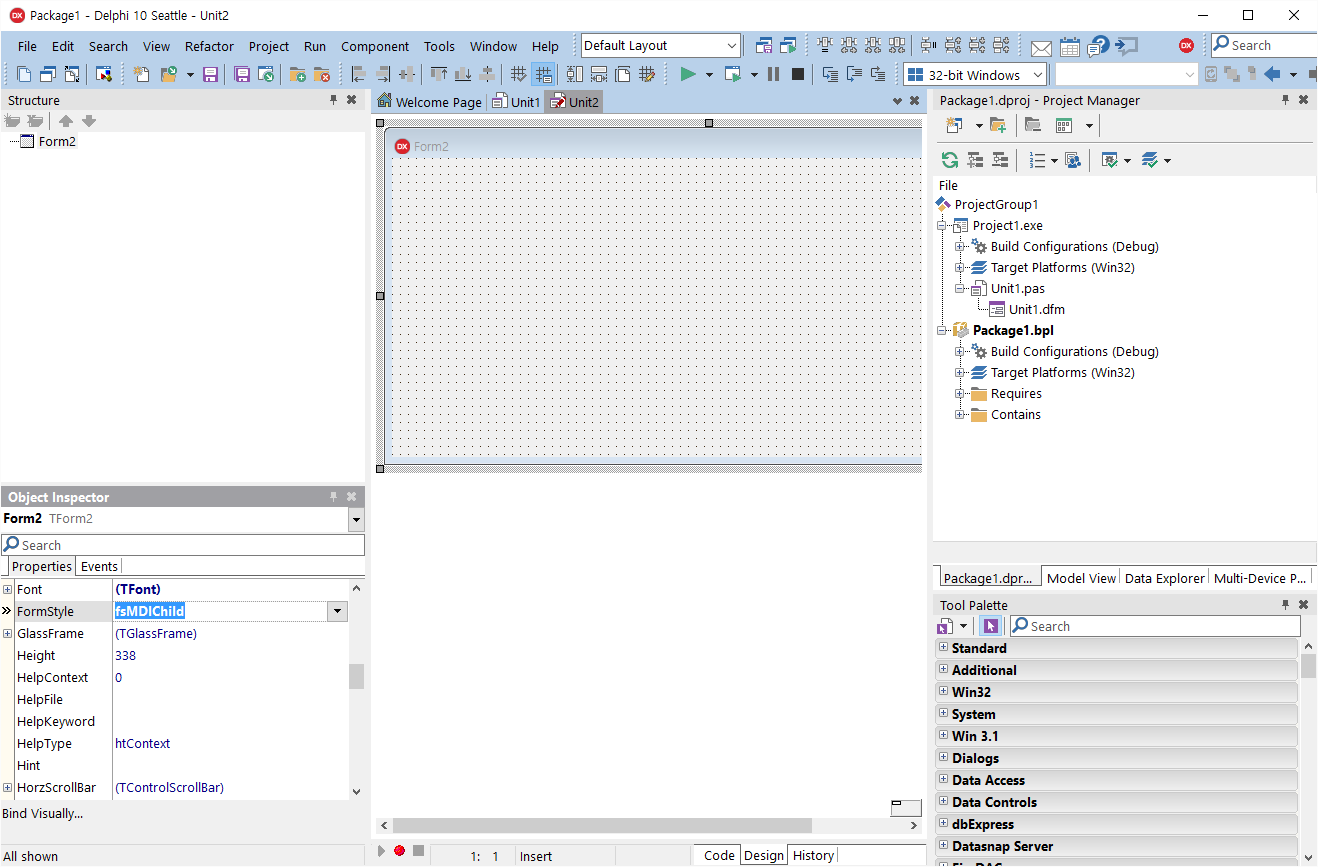


4. 각 프로젝트의 산출물의 결과는 output 폴더로 지정하려 한다.
-각 프로젝트의 옵션에서 output 폴더를 새로 지정하자


이렇게 한건 별거 없다.
결과물을 같은 폴더내에 두어서, 찾기 쉽게 하려고 하기 위함이다.

5. 이제 패키지 프로젝트를 컴파일 하자
패키지 등록창이 뜨면 OK

6. 이제 메인프로젝트로 가서 옵션-package-runtime packages에서 link with runtime package를 true로 전환한다. - 실행중에 패키지 이용한다는 뜻이니까!


----------딱 여기까지가 인터넷에 알려진 정보임

7. 메인폼에 코드 작성
unit unit1;

interface

uses
  Winapi.Windows, Winapi.Messages, System.SysUtils, System.Variants, System.Classes, Vcl.Graphics,
  Vcl.Controls, Vcl.Forms, Vcl.Dialogs, Vcl.StdCtrls;

type
  TForm1 = class(TForm)
    Button1: TButton;
    procedure Button1Click(Sender: TObject);
  private
    { Private declarations }
    pckmodule : HMODULE;  <==
    tmpclass : TPersistentClass;  <==

  public
    { Public declarations }
  end;

var
  Form1: TForm1;

implementation

{$R *.dfm}

procedure TForm1.Button1Click(Sender: TObject);
begin
  pckmodule := LoadPackage('search.bpl');  <==활용할 bpl 파일을 로딩.

  tmpclass := GetClass('TForm2');  <==클래스 따야겠죠?

  with TComponentClass(tmpclass).Create(Application) as TCustomForm do
  begin
    Show;
  end;

end;

end.


8. child폼에 코드 작성
unit unit2;

interface

uses
  Winapi.Windows, Winapi.Messages, System.SysUtils, System.Variants, System.Classes, Vcl.Graphics,
  Vcl.Controls, Vcl.Forms, Vcl.Dialogs;

type
  TForm2 = class(TForm)
  private
    { Private declarations }
  public
    { Public declarations }
  end;

var
  Form2: TForm2;

implementation

{$R *.dfm}


initialization  <==초기화. 클래스 등재 해야겠죠?
  RegisterClass(TForm2);


finalization  <==
  UnRegisterClass(TForm2);


end.

9. 전체적으로 컴파일 해서 메인프로그램 구동 시키기. 완성-끝


전체적으로 빠른 실행결과물을 뽑기 위해 작성하긴 했는데 이 단순 방법 말고도 여러방법으로 응용이 가능하다.
다만, bpl처음 실행하는 분들을 위해 어려움 최소화 하라고 경험포스팅 해 보았다.


2013-06-24

[델파이] ShellExecute사용하기

프로그램을 띄우거나 파일을 실행할경우 ShellAPI 함수인 ShellExecute() 를 사용합니다. 
이 함수는 윈도우즈 탐색기에서 파일을 선택하고 더블클릭하는 기능과 동일한 동작을 합니다. 
다음은 ShellExecute() 의 몇가지 사용예입니다. 

(1) 파일과 연관(association)된 프로그램으로 파일을 엽니다 
ShellExecute(Handle, 'open', PChar('test.txt'), nil, nil, SW_SHOW); 

(2) notepad.exe 에 파라미터로 config.sys 파일을 주어 메모장을 실행합니다 
ShellExecute(Handle, 'open', 'notepad', 'c:\config.sys', nil, SW_SHOW); 

(3) PC에 설치된 기본 웝브라우저로 지정한 사이트를 엽니다. 
ShellExecute(Handle, 'open', 'www.howto.pe.kr', nil, nil, SW_SHOW); 

(4) 특정 폴더를 시작 폴더로 하는 윈도우즈 탐색기를 엽니다 
ShellExecute(Handle, 'explore', PChar('c:\windows)', nil, nil, SW_SHOW); 

(5) readme.doc 파일을 연결된 프로그램으로 인쇄하고 화면을 닫습니다 
ShellExecute(Handle, 'print', 'readme.doc', nil, nil, SW_SHOW); 

(6) rMyDelphiFile.pas 파일을 wordpad 프로그램으로 인쇄하고 화면을 닫습니다 
ShellExecute(Handle, 'print', 'wordpad.wxe', 'MyDelphiFile.pas', nil, SW_SHOW); 

(7) readme.doc 파일을 프린터를 선택하여 연결된 프로그램으로 인쇄하고 화면을 닫습니다 
var 
Device : array[0..255] of char; 
Driver : array[0..255] of char; 
Port : array[0..255] of char; 
S: String; 
hDeviceMode: THandle; 
begin 
Printer.PrinterIndex := -1; // 프린터 인덱스를 지정합니다. 여기서는 기본 프린터(-1) 선택 
Printer.GetPrinter(Device, Driver, Port, hDeviceMode); 
S := Format('"%s" "%s" "%s"',[Device, Driver, Port]); 
ShellExecute(Handle, 'printto', 'readme.doc', Pchar(S), nil, SW_HIDE); 

(8) 기본 메일 프로그램을 실행합니다. 
ShellExecute(Handle, nil, 'mailto:cozy@howto.pe.kr', nil, nil, SW_SHOW); 

(9) DOS 명령어를 실행하고 화면을 닫습니다 
ShellExecute(Handle, 'open', PChar('command.com'), PChar('/c copy file1.txt file2.txt'), nil, SW_SHOW); 

(10) DOS 명령어를 실행하고 화면을 닫지 않습니다 
ShellExecute(Handle, 'open', PChar('command.com'), PChar('/k dir'), nil, SW_SHOW); 

(11) ShellExecute()의 리턴값은 실행된 프로그램의 핸들이거나 에러코드입니다 
리턴값이 32 이하이면 에러가 발생한것으로 각각은 아래와 같은 의미가 있습니다 

var 
code: Integer; 
begin 
code := ShellExecute(...); 
if code <= 32 then ShowMessage(ShowShellExecuteError(code)); 
end; 

// ShellExecute()의 리턴코드에 대한 에러 메시지 
function ShowShellExecuteError(i: integer): String; 
begin 
case i of 0: result := 'The operating system is out of memory or resources.'; 
ERROR_FILE_NOT_FOUND: result := 'The specified file was not found.'; 
ERROR_PATH_NOT_FOUND: result := 'The specified path was not found.'; 
ERROR_BAD_FORMAT: result := 'The .EXE file is invalid (non-Win32 .EXE or error in .EXE image).'; 
SE_ERR_ACCESSDENIED: result := 'The operating system denied access to the specified file.'; 
SE_ERR_ASSOCINCOMPLETE: result := 'The filename association is incomplete or invalid.'; 
SE_ERR_DDEBUSY: result := 'The DDE transaction could not be completed because other DDE transactions were being processed.'; 
SE_ERR_DDEFAIL: result := 'The DDE transaction failed.'; 
SE_ERR_DDETIMEOUT: result := 'The DDE transaction could not be completed because the request timed out.'; 
SE_ERR_DLLNOTFOUND: result := 'The specified dynamic-link library was not found.'; 
//SE_ERR_FNF : result:='The specified file was not found.'; 
SE_ERR_NOASSOC : result:='Unbekannter Extender.'; 
SE_ERR_OOM: result := 'There was not enough memory to complete the operation.'; 
//SE_ERR_PNF : result:='The specified path was not found.'; 
SE_ERR_SHARE: result := 'A sharing violation occurred.'; 
end; 
end; 

(12) ShellExecuteEx()를 이용하여 notepad.exe 를 실행한 후 종료될때까지 기다립니다 
var 
SEInfo: TShellExecuteInfo; 
ExitCode: DWORD; 
ExecuteFile, ParamString, StartInString: string; 
begin 
ExecuteFile := 'notepad.exe'; // 실행할 프로그램 
ParamString := 'c:\winzip.log'; // 프로그램의 명령행 파라미터 
StartInString := 'c:\'; // 시작 위치 
FillChar(SEInfo, SizeOf(SEInfo), 0); 
SEInfo.cbSize := SizeOf(TShellExecuteInfo); 

with SEInfo do 
begin 
fMask := SEE_MASK_NOCLOSEPROCESS; 
Wnd := Application.Handle; 
lpFile := PChar(ExecuteFile); 
lpParameters := PChar(ParamString); 
lpDirectory := PChar(StartInString); 
nShow := SW_SHOWNORMAL; 
end; 
if ShellExecuteEx(@SEInfo) then 
begin 
repeat 
Application.ProcessMessages; 
GetExitCodeProcess(SEInfo.hProcess, ExitCode); 
until (ExitCode <> STILL_ACTIVE) or Application.Terminated; 
ShowMessage('프로그램이 종료되었습니다'); 
end 
else ShowMessage('프로그램을 실행할 수 없습니다');

2013-06-19

[델파이] SysUtils 유닛에 있는 몇가지 함수들

procedure MkDir(const S: string); overload; 
function CreateDir(const Dir: string): Boolean; 
function ForceDirectories(Dir: string): Boolean; 
디렉토리 생성 

function RemoveDir(const Dir: string): Boolean; 
디렉토리 지우기 

function DirectoryExists(const Directory: string): Boolean; 
디렉토리가 있는지 검사하기 

function GetCurrentDir: string; 
현재 디렉토리 알아오기 

function SetCurrentDir(const Dir: string): Boolean; 
디렉토리 경로 이동 

function ExtractFileDir(const FileName: string): string; 
인자가 'c://abcaa.exe' 라면 'c://abc' 를 리턴한다. 

function ExtractFilePath(const FileName: string): string; 
인자가 'c://abcaa.exe' 라면 'c://abc//' 를 리턴한다. 

function ExtractFileDrive(const FileName: string): string; 
인자가 'c://abc//aa.exe' 라면 'c:' 를 리턴한다. 

function ExtractFileExt(const FileName: string): string; 
인자가 'c://abc//aa.exe' 라면 '.exe' 를 리턴한다. 

function ExtractFileName(const FileName: string): string; 
인자가 'c://abc//aa.exe' 라면 'aa.exe' 를 리턴한다. 

function FileCreate(const FileName: string): Integer; overload; 
파일을 생성한다. 

function FileExists(const FileName: string): Boolean; 
파일이 있는지 검사한다. 

function RenameFile(const OldName, NewName: string): Boolean; 
파일 이름 바꾸기 

function ChangeFileExt(const FileName, Extension: string): string; 
파일 이름 문자열 확장자 바꾸기(실제 파일을 바꾸는게 아니며, 바뀐 문자열만 리턴한다.) 

function FileSize(var F): Integer; 
파일 크기 알아내기 

function DeleteFile(const FileName: string): Boolean; 
파일 삭제 

function FileCreate(const FileName: string): Integer; overload; 
파일 생성 

function FileAge(const FileName: string): Integer; 
파일을 생성한 날짜를 알아온다. 

function FileDateToDateTime(FileDate: Integer): TDateTime; 
위의 FileAge() 하면 int를 리턴하는데, int값을 TdateTime 값으로 리턴해준다. 

function FileSetDate(Handle: Integer; Age: Integer): Integer; overload; 
파일을 생성한 날짜를 변경한다. 

function DateTimeToFileDate(DateTime: TDateTime): Integer; 
TdataTime형을 int값으로 리턴한다. 

function FileSetAttr(const FileName: string; Attr: Integer): Integer; 
파일의 속성을 변경한다(읽기전용,숨김등..) 

function FileSetReadOnly(const FileName: string; ReadOnly: Boolean): Boolean; 
파일을 읽기전용으로 만들거나 해제한다. (True=읽기전용으로, False=해제) 

function FileOpen(const FileName: string; Mode: LongWord): Integer; 
파일일 오픈한다. (리턴받은 Int형은 파일을 핸들) 

function FileRead(Handle: Integer; var Buffer; Count: Integer): Integer; 
파일에서 데이터 읽기 

function FileWrite(Handle: Integer; const Buffer; Count: Integer): Integer; 
파일에 데이터 쓰기 

function FileSeek(Handle, Offset, Origin: Integer): Integer; overload; 
파일에서 위치를 이동시킨다. 

procedure FileClose(Handle: Integer); 
파일 닫기 

function DiskSize(Drive: Byte): Int64; 
드라이브(디스크) 용량 알아오기 

function DiskFree(Drive: Byte): Int64; 
드라이브 남은 용량 
(인자: 0=디폴트 드라이브, 1=A:, 2=B:, 3=C:, 4=D: 등) 

procedure FreeAndNil(var Obj); 
오브젝트를 nil로 만든다. 

function Format(const Format: string; const Args: array of const): string; overload; 
function Format(const Format: string; const Args: array of const; const FormatSettings: TFormatSettings): string; overload;
리턴받은 string에 형식에 맞게 값들을 넣어준다. 
예) 
var 
  str: string; 
  a,b: integer; 
begin 
  str := '(값)'; 
  a := 10; 
  b := 20; 
  ShowMessage( Format('%s A:%d , B:%d',[str, a,b]) ); 
end; 
결과: (값) A:10 , B:20 

function AnsiPos(const Substr, S: string): Integer; 
S 값에서 Substr 값이 어디에 있는지 위치를 리턴한다. (0을 리턴하면 일지문자 없음) 

function AnsiLowerCase(const S: string): string; 
function AnsiLowerCaseFileName(const S: string): string; 
function AnsiLastChar(const S: string): PChar; 
S 값을 소문자로 변경해서 리턴한다. (위는 같은 일을 하는 함수들) 


function AnsiUpperCase(const S: string): string; 
function AnsiUpperCaseFileName(const S: string): string; 
function AnsiStrUpper(Str: PChar): PChar; 
S 값을 대문자로 변경하여 리턴한다. 

function AnsiExtractQuotedStr(var Src: PChar; Quote: Char): string; 
function AnsiDequotedStr(const S: string; AQuote: Char): string; 
S 문자열에서 AQuote 값을 시작점을 찾고, 끝 지점가지 문자열을 리턴한다. 
예) ShowMessage( AnsiDequotedStr('-ABCDEF-GHIJK$..', '-') ); 
결과) ABCDEF 
AQuote 값은 S문자열에 첫 위치에 꼭 와야하며, 쌍으로 이루어져야한다. 

function AnsiCompareFileName(const S1, S2: string): Integer; 
function AnsiCompareStr(const S1, S2: string): Integer; 
function AnsiCompareText(const S1, S2: string): Integer; 
S1, S2문자의 크기를 비교한다. (길이는 상관없고, 앞쪽에 있는 문자가 먼저 큰지를 판단한다) 
S1 = S2 =  0 
S1 > S2 =  1 
S1 < S2 = -1 
예)  ShowMessage( IntToStr( AnsiCompareText('0146','015') ) ); 
      // -1을 리턴한다. 

function AnsiLastChar(const S: string): PChar; 
S 문자열에서 제일 마지막 문자를 리턴한다. (2바이트 문자일 경우 2바이트 값을 다 리턴한다.) 

function AnsiQuotedStr(const S: string; Quote: Char): string; 
S 문자열 앞과 뒤에 Quote 값을 집어넣는다. (S에 Quote와 같은 값이 있을경우 옆에 하나씩 더 추가된다.) 

function AnsiSameStr(const S1, S2: string): Boolean; 
S1과 S2 문자열이 일치하면 True를 리턴한다. (대소문자도 비교한다.) 

function AnsiSameText(const S1, S2: string): Boolean; 
S1과 S2 문자열이 일치하면 True를 리턴한다. (대소문자 무시) 

function AnsiStrComp(S1, S2: PChar): Integer; 
값 비교 

procedure AppendStr(var Dest: string; const S: string); deprecated; 
Dest := Dest + S; 와 같다. 

function BoolToStr(B: Boolean; UseBoolStrs: Boolean = False): string; 
두개의 Boolean 값을 비교해서 특정값을 문자열로 리턴한다. 
true        false  = 1 
true        true  = TRUE 
false        false  = -1 
false        true  = FALSE 

function ByteToCharIndex(const S: string; Index: Integer): Integer; 
S 문자열의 길이보다 Index 값이 크면, 0을 리턴한다. (그외 Index 값 리턴) 

function ByteToCharLen(const S: string; MaxLen: Integer): Integer; 
S 문자열 길이보다 MaxLen 값이 크면, S 길이를 리턴한다. (그 외 MaxLen 값 리턴) 

function ByteType(const S: string; Index: Integer): TMbcsByteType; 
S[Index] 값이 1바이트 값인지, 2바이트(한글) 값의 첫번째 바이트인지, 두번째 바이트인지 판별한다. 
예) 
var 
  ty: TMbcsByteType; 
begin 
  ty := ByteType('ABC하하012',5); 
  case ty of 
    mbSingleByte: ShowMessage('1byte 문자'); 
    mbLeadByte  : ShowMessage('2byte 문자의 첫번째 바이트'); 
    mbTrailByte : ShowMessage('2byte 문자의 두번째 바이트') 
  end; 
end; 

function CharLength(const S: String; Index: Integer): Integer; 
S[Index] 값이 1바이트 문자이면 1을 리턴, 2바이트 문자이면 2을 리턴한다. 

function CompareMem(P1, P2: Pointer; Length: Integer): Boolean; assembler; 
메모리 비교를 한다.

2013-05-31

[델파이]파일 읽기 쓰기


unit Unit1;
interface
uses
  Windows, Messages, SysUtils, Variants, Classes, Graphics, Controls, Forms,
  Dialogs, StdCtrls, ComCtrls, Gauges;
type
  TForm1 = class(TForm)
    Button1: TButton;
    Button2: TButton;
    OpenDialog1: TOpenDialog;
    SaveDialog1: TSaveDialog;
    Button4: TButton;
    ProgressBar1: TProgressBar;
    Gauge1: TGauge;
    Animate1: TAnimate;
    Button3: TButton;
    Button5: TButton;
    Button6: TButton;
    procedure Button6Click(Sender: TObject);
    procedure Button5Click(Sender: TObject);
    procedure Button3Click(Sender: TObject);
    procedure Button4Click(Sender: TObject);
    procedure Button2Click(Sender: TObject);
    procedure Button1Click(Sender: TObject);
  private
    { Private declarations }
  public
    { Public declarations }
  end;
var
  Form1: TForm1;
implementation
uses Unit2;
{$R *.dfm}
//------------------------------------------------------------------------------
// 파일생성
//------------------------------------------------------------------------------

procedure TForm1.Button1Click(Sender: TObject);
var
  F : TextFile;
  FH : Integer;
begin
  // AssignFile로 파일 생성  AssignFile(F, 'C:\DelphiSourceDataRoom\파일다루기\AssignFile.txt');
  Rewrite(F); // 쓰기모드로 오픈
  CloseFile(F); // 파일 닫음
  // FileCreate로 파일 생성
  FH := FileCreate('C:\DelphiSourceDataRoom\파일다루기\FileCreate.txt');
  FileClose(FH); // 파일닫음
end;
//------------------------------------------------------------------------------
// 파일 읽고 쓰고 복사하기
//------------------------------------------------------------------------------
procedure TForm1.Button2Click(Sender: TObject);
var
  FH1, FH2 : Integer; // 파일 핸들  Buffer : array[1..1024] of char; // 버퍼  iCount : Integer; // 파일크기  iFileSize : Integer; // 파일크기
begin
  if OpenDialog1.Execute then begin // 열기 대화상자 실행    // fmShareDenyWrite : 다른파일을 사용하고있어도 읽어올수있도록 허용    FH1 := FileOpen(OpenDialog1.FileName, fmShareDenyWrite); // 파일 오픈    iFileSize := FileSeek(FH1, 0, 2); // 파일 사이즈 측정(주의. 파일끝으로 포인터이동)    FileSeek(FH1, 0, 0); // (파일 포인터를 맨앞으로 다시이동)
    if FH1 <> -1 then begin // FH1 파일 핸들값이 존재한다면
      if SaveDialog1.Execute then begin // 저장 대화상자 실행        FH2 := FileCreate(SaveDialog1.FileName); // 저장명으로 파일생성
          if FH2 <> -1 then begin // 생성한 FH2 파일행들값이 존재한다면
            // 파일을 1024만큼 읽어드리고 그 크기를 반환한다.
            iCount := FileRead(FH1, Buffer, sizeof(Buffer));
            // 프로그레스바 초기화
            ProgressBar1.Min := 0;
            ProgressBar1.Max := iFileSize;
            ProgressBar1.Position := 0;
            // 게이지 초기화            Gauge1.MinValue := 0;
            Gauge1.MaxValue := iFileSize;
            Gauge1.Progress := 0;
            // 에니메이터 초기화
            Animate1.CommonAVI := aviCopyFiles;
            while iCount <> 0 do begin // 파일에 내용이 있을때까지 반복해서 읽는다.
              ProgressBar1.Position := ProgressBar1.Position + sizeof(Buffer); // 진행상태 프레그레스바에 표시              Gauge1.Progress := Gauge1.Progress + sizeof(Buffer); // 진행상태 게이지에 표시
              FileWrite(FH2, Buffer, iCount); // FH1의 내용을 FH2에 쓴다              iCount := FileRead(FH1, Buffer, sizeof(Buffer)); // FH1 뒤에 이어서 읽어들인다.            end;
            // 에니메이터 동작 중지            Animate1.Active := False;
            Animate1.Visible := False;
            ShowMessage('파일 복사작업이 완료되었습니다.');
          End
          else begin
            ShowMessage('파일을 생성하던중 에러가 났습니다.');
            FileClose(FH1); // FH1 파일을 닫는다.          End;
      End;
      FileClose(FH2); // FH2 파일을 닫는다.    End
    else ShowMessage('파일 오픈시 에러가 발생하였습니다.');
    FileClose(FH1); // FH1를 닫는다.  End;
End;
//------------------------------------------------------------------------------
// 파일 크기 알아보기
//------------------------------------------------------------------------------

procedure TForm1.Button4Click(Sender: TObject);
var
  FH3 : Integer;
  iFileSize : Integer;
begin
  FH3 := FileOpen('C:\DelphiSourceDataRoom\파일다루기\AssignFile.txt', fmShareDenyWrite);
  // FileSeek Origin(Handle, Offset, Origin)
  // 0 : 파일 포인터가 파일의 처음에서 Offset의 바이트수에 해당하는 위치로 포인터를 이동.
  // 1 : 파일 포인터가 현재의 위치에서 Offset의 바이트수에 해당되는 위치로 포인터를 이동.
  // 2 : 파일 포인터가 파일의 끝에서 Offset의 바이트수에 해당되는 위치로 포인터를 이동
  iFileSize := FileSeek(FH3, 0, 2); // 파일 사이즈  ShowMessage('AssignFile.txt : ' + IntToStr(iFileSize));
  FileClose(FH3); // 파일 닫기end;
// 파일의 생성 날짜 조회
procedure TForm1.Button3Click(Sender: TObject);
var
  dtDate : TDateTime; // 파일 생성날짜  FH4 : Integer; // 파일핸들
begin
  if OpenDialog1.Execute then begin // 열기 대화상자 실행    // fmShareDenyWrite : 다른파일을 사용하고있어도 읽어올수있도록 허용
    FH4 := FileOpen(OpenDialog1.FileName, fmShareDenyWrite); // 파일 오픈    dtDate := FileDateToDateTime(FileGetDate(FH4)); // 파일의 날짜 조회    ShowMessage(DateTimeToStr(dtDate));
    FileClose(FH4); // 파일 닫음  end;
end;
//------------------------------------------------------------------------------
// 디렉토리내에서 파일찾기
//------------------------------------------------------------------------------

procedure TForm1.Button5Click(Sender: TObject);
var
  Form2 : TForm2;
begin
  Form2 := TForm2.Create(Application);
  Form2.Show;
end;
//------------------------------------------------------------------------------
// 파일의 속성값 얻어오고 변경하기
//------------------------------------------------------------------------------

procedure TForm1.Button6Click(Sender: TObject);
var
  FH5 : Integer;
  FileSetDataResult: Integer;
  FileDate: Integer;
begin
  if OpenDialog1.Execute then begin // 열기 대화상자 실행
    // 파일을 읽기속성 or 쓰기 속성으로 바꿈    FileSetAttr(OpenDialog1.FileName, fmShareDenyNone);
    FH5 := FileOpen(OpenDialog1.FileName, fmOpenReadWrite); // 파일 오픈
    try
      // 파일날짜 변경
      FileDate := DateTimeToFileDate(StrToDateTime('2001-05-21 01:01:01'));
      FileSetDataResult := FileSetDate(FH5, FileDate);
      if FileSetDataResult <> 0 then
      begin
        ShowMessage('파일날짜 변경 실패 : '+IntToStr(FileSetDataResult));
      end;
    finally
      FileClose(FH5); // 파일 닫음    end;
    // FileSetAttr(OpenDialog1.FileName, faReadOnly); // 파일을 읽기속성으로 바꿈  End;
end;
end.

[델파이] stored procedure 사용하기

델파이로 C/S 프로그램밍을 하다 보면, SQL 서버의 성능 및 보안 등 여러 유용함으로 저장 프로시저를 많이 사용하게 됩니다. 아래는 ADO의 TADOStoredProc를 통한 저장 프로시저 호출에 대한 부분을 정리하여 보았습니다. ADO가 아닌 다른 경우에도 대동소이할겁니다.

1. 호출 과정
  1. TADOStoredProc 객체를 생성(Create)합니다.
  2. 저장 프로시저를 호출하기 위한 여러 속성들, 연결(Connection) 및 저장 프로시저 이름(ProcedureName) 등을 설정합니다.
  3. 파라미터를 초기화합니다.(CreateParameter)
  4. 저장 프로시저를 실행합니다.(Open / ExecProc)
  5. 저장 프로시저가 실행된 결과를 받아서 처리합니다.(RecordCount, Eof, Fields, MoveNext 등)
  6. 사용이 끝난 객체는 닫고 소멸시킨다.


2. Open(또는 Active)과 ExecProc의 차이점
  • Open(또는 Active)
    • 저장 프로시저를 실행한 결과셋을 받습니다.
    • Active 속성이 True로 설정됩니다.
    • RecordSet 속성에 결과셋이 있습니다.
  • ExecProc
    • 저장 프로시저를 서버에서 실행만 시킵니다.
    • Active, RecordSet 속성이 변화하지 않습니다.

3. 저장 프로시저의 RETURN 값 받아 처리하기
  • 파라미터를 추가할 때, 제일 먼저 "@RETURN_VALUE" 파라미터를 추가합니다.
  • 저장 프로시저가 실행되고 난 후의 결과를 파리미터로 받아옵니다.

01.var
02.ADOStoredProc1 : TADOStoredProc;
03.begin
04.ADOStoredProc1 : TADOStoredProc.Create(nil);
05.with ADOStoredProc1 do
06.try
07.ProcedureName := 'usp_stored_proc';
08.Connection := FADOConnection;
09.Parameters.Clear;
10.Parameters.CreateParameter('RETURN_VALUE', ftInteger, pdReturnValue, 0, null);
11.Parameters.CreateParameter('@start_temp_no', ftInteger, pdInput, 0, 680000);
12. 
13.ExecProc;
14.ShowMessage('RETURN_VALUE = ' + IntToStr(Parameters[0].Value) + #13#10 +
15.'RecordCount = ' + IntToStr(Recordset.RecordCount));
16. 
17.// Error 발생
18.finally
19.ADOStoredProc1.Free;
20.end;
21.end;

  • 위 예제에서는 마지막 라인에서 오류가 발생합니다. 왜냐하면 ExecProc는 결과셋을 받지 않기 때문에, RecordCount 속성을 접근하려할 때 오류가 발생하게 된다.
  • 위와 같이 저장 프로시저의 파라미터를 직접 생성하여 호출할 경우에 있어서 대상 DB가 MS-SQL 서버의 경우 저장 프로시저의 파라미터를 실제 서버의 저장 프로시저 순서대로 생성(CreateParaameter)해 주어야 정상적으로 저장 프로시저가 호출이 됩니다. 그렇지 않은 경우, 전혀 엉뚱한 결과가 나오거나, 알 수 없는 오류가 발생하게 됩니다.